Advanced Active Directory Assessment by SmartProfiler/SecID.
MITRE & ANSSI SUPPORTED
368
CHECKS
CIS/NIST
SUPPORTED
PERMISSIONS
ANALYZER
AD ISSUES
FIXER
AD GPO
ANALYZER
DC HEALTH
CHECKER
ASSESSMENT
SCHEDULER
It’s crucial to carry out an advanced assessment before purchasing any monitoring software for Microsoft Active Directory to make sure the tool can keep an eye on all the problems the assessment tool finds—something the SmartProfiler for Active Directory does! Not every assessment tool examines every facet of Active Directory environments. SmartProfiler is designed to uncover issues in On-Premises Active Directory.
Active Directory is a primary source for Authentication and Authorization for users and business applications. Microsoft doesn’t provide out of the box tools that can be used to perform health & risk assessment of Active Directory environment. SmartProfiler AD-OnPrem Security Tool can be used to perform Active Directory assessment for multiple AD forests and provide an assessment report which includes issues and recommendations to fix the issues.
Health Check involves evaluating the tool's capability to perform health checks on various components. For Active Directory, this may include assessing the KCC component, DNS, domain controllers, replication, active directory site coverage, partition backup, inconsistent states of domain controllers, orphaned domain controllers, undefined subnets, and DCDiag tests, among others.
Misconfiguration entails the tool's ability to identify and report misconfiguration items. In the context of Active Directory, this may cover aspects such as undefined subnets, AD Site Links, replication topology, time synchronization, Fine-Grained Password Policy (FGPP) parameters, Domain Account Policy parameters, manual bridgehead servers, DNS static records and more.
Security and Risk assessment involves evaluating whether the tool can perform a comprehensive analysis of security vulnerabilities and risks. Specifically for Active Directory, this may include examining LAN Manager Hashes, SMB Signing, LDAP Signing, NT4Crypto, accounts with blank passwords, accounts using SPNs, unauthenticated domain controllers, and numerous other tests.
Performance assessment focuses on the tool's ability to evaluate component performance. In the case of Active Directory, the primary focus is on domain controllers. It is important to monitor KCC and LDAP performance, as they heavily influence domain controllers' functionality, depending on the size of the environment.
Non-Compliance evaluation involves checking for non-compliant items. For Active Directory, although the number of such items may be limited, the tool should at least highlight the privileged users added in the past 10 days. It should also assist in closely monitoring admin and user activities and facilitating recovery from security incidents.
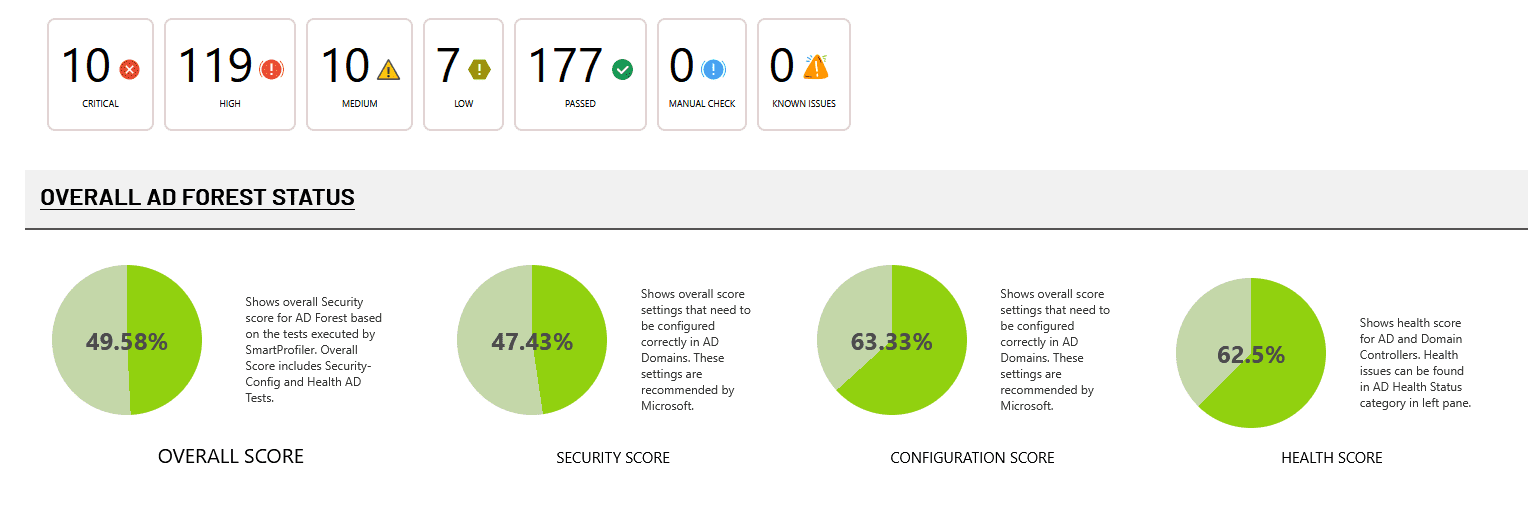
SmartProfiler/SecID for Active Directory provides a comprehensive assessment of your AD environment by generating a detailed report that includes:
Security Score – Evaluates how well your AD is protected against known attack vectors and misconfigurations.
Health Score – Measures the stability and operational health of your AD infrastructure.
Configuration Score – Assesses alignment with best practices and compliance standards like CIS, NIST, MITRE, and ANSSI.
By combining these scores, SmartProfiler gives you a clear picture of your current security posture—highlighting strengths, identifying vulnerabilities, and offering actionable recommendations to improve overall AD security and resilience.
This assessment helps organizations proactively secure their Active Directory before attackers can exploit weaknesses.
Active Directory reports generated by SmartProfiler include comprehensive details, such as identified issues, their potential impact, and recommended remediation steps. These reports are valuable for domain consolidation efforts and provide visibility into risks across all domains within an Active Directory forest.
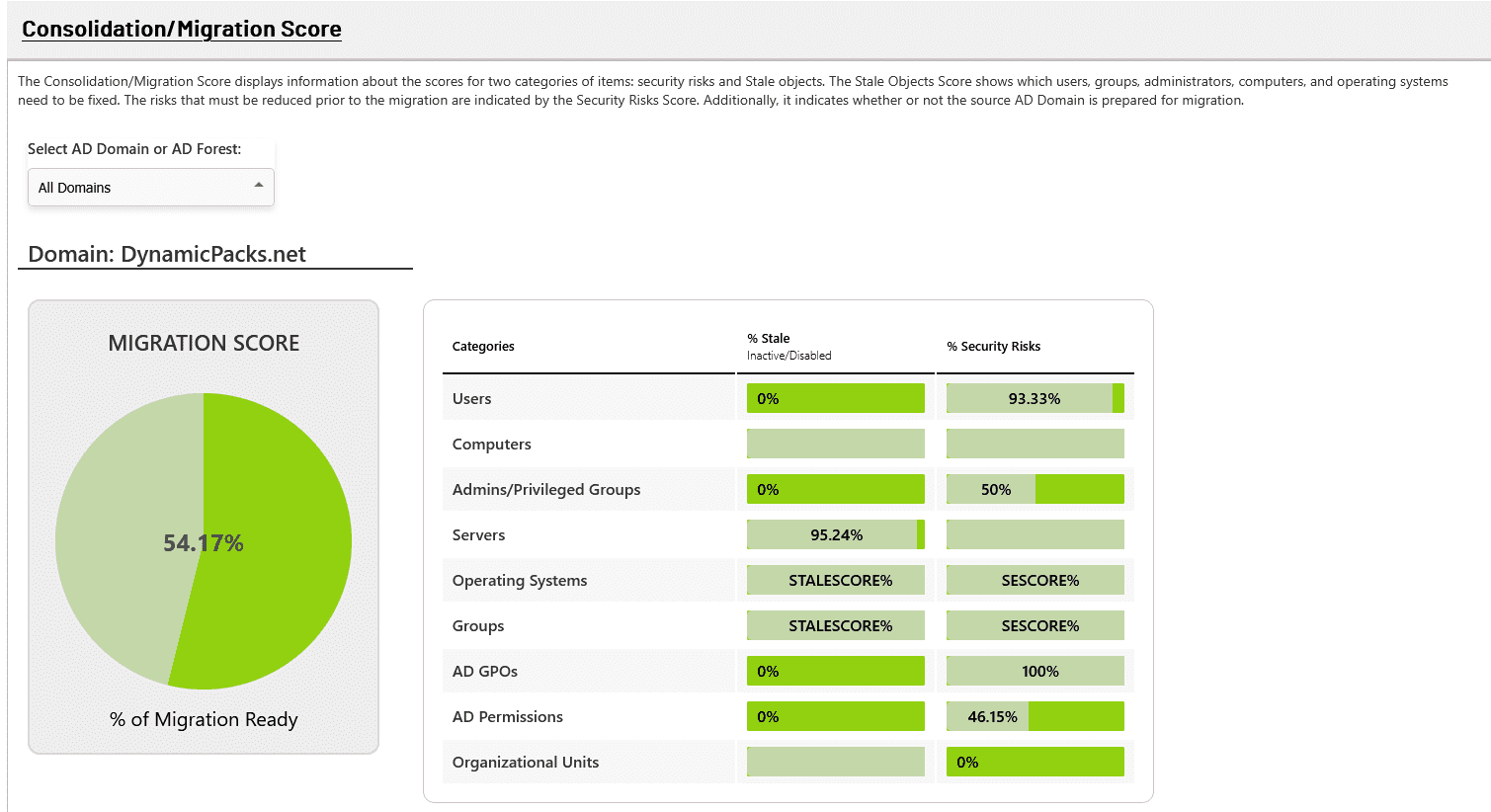
Is Your AD Domain Migration Ready?
Whether you’re migrating from Active Directory to Entra ID or from one AD domain to another, it’s critical to understand the potential object-level issues you’ll need to resolve. The AD Security Assessment by SecID provides a comprehensive AD Migration Score, helping you determine whether your domain is ready for migration or if remediation is needed beforehand.
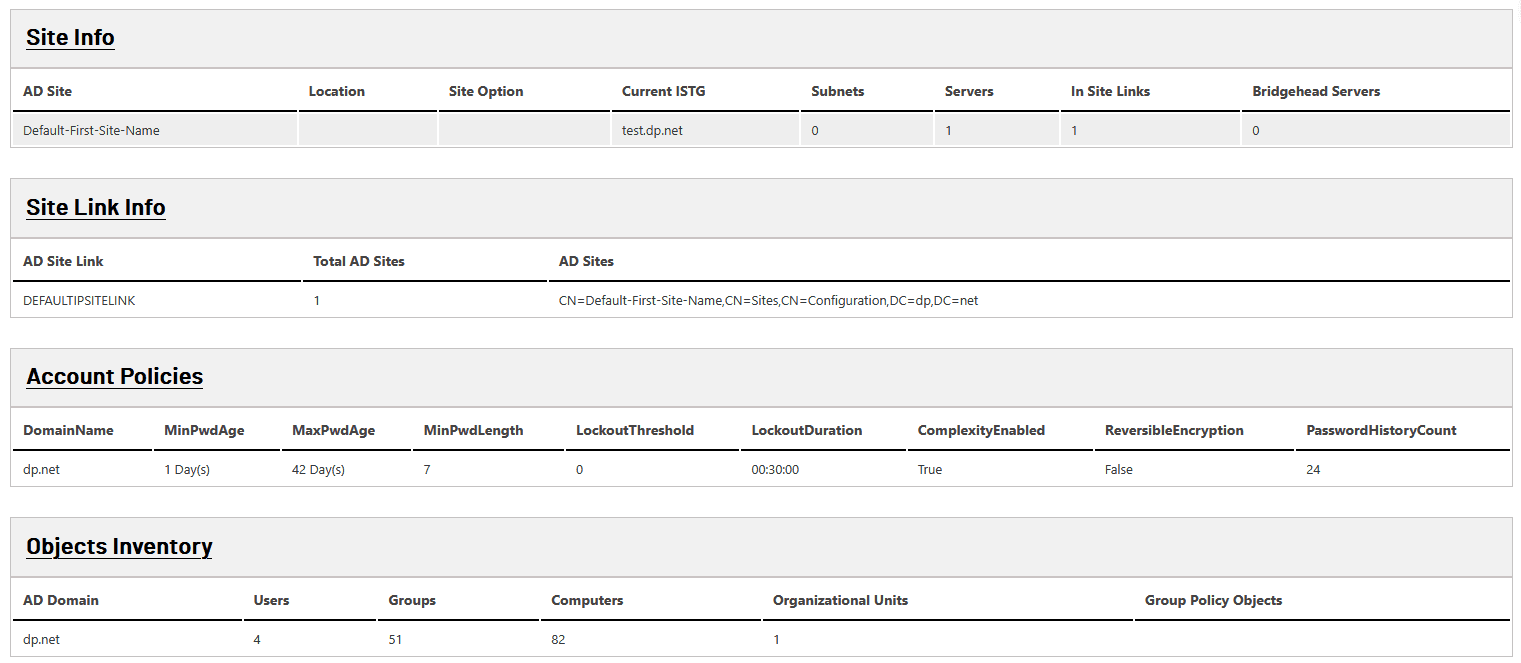
Gathering a complete inventory of your Active Directory environment is a critical first step in any migration project. This includes details about users, groups, organizational units (OUs), computers, service accounts, trust relationships, and GPOs.
Why is this important? A detailed inventory helps identify outdated, unused, or misconfigured objects that could complicate or delay the migration process. It also provides visibility into dependencies, security configurations, and potential conflicts. With a clear picture of your current AD environment, you can plan more effectively, reduce risk, and ensure a smoother, more efficient transition—whether you’re migrating to Entra ID or consolidating AD domains.
A complete and accurate Active Directory inventory is essential for planning a secure and efficient migration. Beyond just users and groups, it’s important to collect detailed information on:
AD Sites and Site Links – to understand network topology and replication behavior
Account Policies and Fine-Grained Password Policies – to ensure consistent security standards
Object Inventory – including computers, service accounts, and organizational units (OUs)
Group Policies (GPOs) – to identify dependencies and avoid post-migration issues
Collecting this broader set of data provides full visibility into the environment, helps identify potential roadblocks, and ensures that no critical configurations are missed. This foundational step enables accurate planning, risk mitigation, and a smoother transition to Entra ID or another AD domain.
SecID for Active Directory can perform assessments using either a Domain Admin account or a regular domain user. However, it is strongly recommended to use a Domain Admin account to ensure a comprehensive and accurate Active Directory assessment.
Note: If a domain user account is used, 57 domain controller-specific tests will be skipped, potentially leaving critical gaps in the assessment.
Using a Domain Admin account ensures all tests, including those targeting domain controllers, are executed successfully.
SecID provides flexibility in how Active Directory assessments can be executed, supporting the following scenarios:
RunAs Account:
If you are unable to log on to the member server running SecID using Domain Admin credentials, you can use the RunAs Account option. This allows you to launch SecID with administrative privileges and then initiate the assessment.
Locally Logged-On User:
SecID can use the credentials of the currently logged-in user—whether a Domain Admin or Domain User—to run the assessment.
Stored Credential Option:
This method allows you to store Domain Admin or Domain User credentials within SecID for running the assessment. This option is also required for configuring and executing continuous Active Directory assessments.
For One-Time Assessment you can use Option 1 and Option 2. However, for continuous assessment, we strongly recommend that you store the Domain Admin or Domain User credentials in SecID.
Know if your Active Directory environment follow all recommendations highlighted by MITRE & ANSSI and CIS/NIST.
SmartProfiler for Active Directory offers additional tests apart from tests offered by MITRE and ANSSI organizations. It is worth noting that SmartProfiler provides a more comprehensive set of tests than the MITRE and ANSSI organizations, offering a total of 368 tests across all relevant categories. While the MITRE and ANSSI provides only 87 tests, SmartProfiler’s additional tests are specifically designed by our Active Directory Experts to ensure that every aspect of Active Directory environment is covered.
MITRE ATT&CK for Enterprise provides a detailed matrix of real-world adversary tactics and techniques, including those specifically targeting Active Directory environments. By evaluating your AD setup against MITRE’s framework, organizations can identify exploitable weaknesses and improve their defense-in-depth strategy.
ANSSI (Agence nationale de la sécurité des systèmes d'information), the French national cybersecurity agency, provides rigorous guidance and security baselines for Active Directory environments, focusing on protecting core AD components, detecting privilege escalation paths, and limiting lateral movement within a network.
CIS Benchmarks and NIST Guidelines complement these efforts by providing prescriptive configuration baselines that promote consistency, resilience, and strong identity governance across Windows Server and AD environments.
Together, these standards serve as an excellent starting point for organizations aiming to align with cybersecurity best practices and regulatory compliance.
While MITRE and ANSSI assessments are critical for identifying core risks, they cover a combined total of only 87 controls related to Active Directory. SmartProfiler for Active Directory takes it several steps further.
Comprehensive Coverage: SmartProfiler includes 300+ Active Directory-specific tests across all critical areas: identity management, delegation, GPOs, replication, auditing, Kerberos, DNS, and more.
Expert-Driven Enhancements: These additional tests are developed by seasoned Active Directory security experts with deep knowledge of real-world threats, misconfigurations, and attack paths that aren't always covered by standard frameworks.
Actionable Insights: The tool not only highlights risks but provides clear remediation steps and prioritization guidance based on severity and impact.
Security Posture Mapping: SmartProfiler can map findings to MITRE ATT&CK, CIS Controls, and NIST 800-53, helping organizations align with compliance frameworks while also strengthening their real-world security posture.
In SmartProfiler for Active Directory dashboard you can see all issues that have been identified during the assessment.
In addition to performing security and health assessment of your Active Directory, SmartProfiler for Active Directory also provides vendor links for each test so you can learn more about each test’s importance and the reasons you should check your environments against vendor recommendations.
SmartProfiler for Active Directory ships with AD Issues Fixer. You can fix low, high and medium issues with a mouse click and follow the on-screen steps to resolve an issue. The AD Issues Fixer can also be used to export the PowerShell script with affected objects to fix the issues. This way you have an opportunity to review the Fix Script before running it. However, please note AD Issues Fixer is an additional license.
With SmartProfiler you can quickly check if a particular GPO Setting or set of GPO Settings are configured in Active Directory Domains or not.
SmartProfiler comes with NIST/CIS Analyzer which can be used to analyze security settings recommended by organizations such as NIST and CIS.
SmartProfiler for Active Directory now enables you to analyze Tier 0 Objects and OU Permissions and fix them. The feature is available as a module and can be used once the license is purchased for AD OU Permissions Analyzer & Fixer.
With Domain Controllers Security Analyzer you can see security status of each domain controller in the Active Directory forest and ensure all domain controllers are not operating with any security risk.
When running Active Directory assessments, the each execution collects data in a separate Assessment Run. For example, you can run first Assessment Run before fixing issues and Second Assessment Run after fixing all issues. Once done you can compare these Assessment Runs using Compare Assessments in SmartProfiler.
With SmartProfiler for Active Directory now you can create your own Active Directory query targeting AD Domains and show the result in SmartProfiler console.
With Active Directory Real-Time Monitoring in SmartProfiler, you can monitor single or all AD Domains in an AD Forest ensuring all risks are captured and notified via email. However, AD real-time monitoring is an additional license and needs to be enabled with SecID.
SmartProfiler checks all important components in Active Directory. Here’s a list of categories.
If you have made the decision to conduct an Active Directory Security Assessment for your production AD Forests, it is crucial to recognize the potential security threats that may exist within your Active Directory environment. However, neglecting to address health and configuration issues poses a significant security risk. In this article, we will explore the importance of performing a “complete” Active Directory assessment, in addition to recommended security tests by organizations such as MITRE and ANSSI.
Learn MoreSmartProfiler or SecID for Active Directory Security Assessment have been developed based on a comprehensive set of tests recommended by leading cybersecurity authorities, including ANSSI, MITRE, and Microsoft. In addition to these established frameworks, the tools also incorporate practical insights and best practices gained through hands-on experience working with organizations worldwide. This blended approach ensures a thorough and effective assessment of Active Directory environments, helping to identify security gaps and improve overall posture.
Here’s the list of frequently asked questions we have put together for each of our products and services. In case you still have any questions or require support on our products please feel free to connect with us using the contact us form or by sending an email to [email protected].
No. SmartProfiler is a ready-only assessment. SmartProfiler Assessment collects data from target tenants and then analyze the data.
No. SmartProfiler collects information in CSV files stored on SmartProfler computer.
It depends on the Assessment Technology as listed below: For Office 365 Assessment 1-2 hours to complete assessment For Active Directory 5 hours. However, it depends on how big the Active Directory environment is. For Azure Virtual Desktop 1-2 hours For Azure 1-2 hours.
SmartProfiler generates reports in Microsoft Word format. However, you can edit Impact and Recommendations for each test before generating the report.
SecID/SmartProfiler can generate report in below formats:
The Microsoft Word report can be rebranded.
Copyright © DynamicPacks Technologies