SmartProfiler-SecID is the best CIS Benchmark Assessment Tool as it automates all CIS Benchmark with minimal efforts. SmartProfiler-SecID, the CIS and NIST Assessment tool is designed to support multiple technologies in a single software application. SmartProfiler-SecID Enterprise Edition ships with both the deployment options; On-Prem and Web App. There are many benefits of using a single software application for multiple technologies. There is no need to install multiple applications for doing assessments of multiple technologies. Secondly, you can easily maintain security score for all technologies in a single application including maintaining known issues databases for all technologies. The SmartProfiler-SecID comes with two editions: Lite Edition and Enterprise Edition. This white paper has been designed to help you understand what SmartProfiler-SecID is beneficial for and how to use it effectively to eliminate the Cyber security risks in your environment.
While this document explains more about the SmartProfiler-SecID tool which can be used for CIS and NIST Assessment, here is an overview of the tools available as part of SmartProfiler Product family:
| Product | Description | Application Type |
| SmartProfiler Quick Assessment CIS/NIST Assessment Tools | Supports single Technology Assessment based on CIS and NIST CSF 2.0. | Desktop App |
| SmartProfiler-SecID Lite Edition | Supports 37 Technologies for quick assessment based on CIS/NIST CSF 2.0 Frameworks. Supports only Assessment Console, Assessment Summary and Generate Report features. | Desktop App |
| SmartProfiler-SecID Enterprise Edition | Supports 37 Technologies for quick assessment based on CIS/NIST CSF 2.0 Frameworks. Supports other features such as Compare Assessment, Security Score, Web App Version, RBAC Control. Designed for MSPs and MSSPs for managing Customer security via Web App. | Desktop App Web App |
| SmartProfiler AVD Assessment & Optimizer | Technical Assessment of AVD Host Pools to find missing performance settings and use Optimizer to generate Optimization Scripts based on your environment. AVD Assessment can also be used to check configuration inconsistencies. | Desktop App |
| SmartProfiler Health Checks | Supports Health Check of Active Directory, VMware, DHCP, AVD and IIS Servers. | Desktop App Web App |
| SmartProfiler GPO Analyzer and Migrator | Used to analyse On-prem GPO and be able to migrate to Intune in a phased approach. | Desktop App |
| SmartProfiler Fixer Tools for CIS/NIST Assessments | Use Fixer Tools to fix issues identified during the CIS/NIST Assessments. | Desktop App |
The creation of SmartProfiler began in 2014 while we were developing an Active Directory Assessment tool for our clients and internal projects. In order to allow modules to be added to the tool at any time, we wanted to create a strong framework. Creating a dynamic framework was our first task. Building an execution framework that can handle running modules based on a particular language was the primary goal of the Dynamic framework. In SmartProfiler, a test module is referred to as a “dynamic pack,” which is a collection of modules tailored to a certain technology. For instance, we have 324 tests for Microsoft Active Directory. Active Directory Assessment Dynamic Packs is another name for AD tests.
We can now handle numerous technology assessments thanks to SmartProfiler’s cutting-edge Dynamic Framework. The evaluation of 37 technologies is now supported by the updated SmartProfiler. Anyone may use SmartProfiler to conduct assessments and produce results in just four easy steps. Although importing new technology dynamic packs is not an option in SmartProfiler, you can create your own by following a brief tutorial.
SmartProfiler supports various security frameworks. The first technology that was introduced is Microsoft Active Directory and then we expanded Microsoft Active Directory Dynamic Packs to leverage tests recommended by ANSSI, MITRE, and Microsoft organizations. With the evolution of SmartProfiler, we leveraged CIS Benchmark, STIG and NIST CSF 2.0. SmartProfiler also supports other standards such as ISO and PCI DSS Compliance.
SmartProfiler-SecID Lite Edition is designed to perform assessment for each technology with minimal steps. For example, for Microsoft 365 CIS Assessment, you can just follow three steps to perform the assessment as listed below:
Checking Assessment Summary and generating reports.
While SmartProfiler-SecID Lite Edition is designed to perform assessment for each technology with minimal steps, Enterprise Edition can be used to perform continuous assessment and also use other features such as comparing assessment, modifying severity, maintaining security score, scheduler to run continuous assessment, multiple assessment views, RBAC Model, maintaining known issues database and so on.
SmartProfiler is not just an assessment tool, it can also be used by MSPs, MSSPs, Service Providers, IT Architects, and IT Managers, and internal IT Teams to perform assessment and generate a report. There are two assessment models available with SmartProfiler as listed below:
The SmartProfiler-SecID Enterprise Edition supports many features which are not available in the Lite Edition. The Lite Edition is designed to perform quick assessment and generate the reports. On the other hand, Enterprise Edition is for end customers needing a tool to perform continuous assessments improving the overall security score of technologies and also be able to compare the assessments as and when needed. The difference between Lite and Enterprise Editions are shown below:

As you can see above, the Lite Edition (Trial versions) can only support executing 22 tests for technology. Other features such as Multiple Assessment Views, RBAC Model, Comparing Assessments, maintaining security score for technologies, Known issues database, Assessment Scheduler, SecID Dashboard, ability to modify modules, customizing impact and recommendations and Fixer tools are not available in Lite Edition.
While the SmartProfiler-SecID Lite Edition is a desktop application designed for quick assessments, Enterprise Edition comes with two deployment options; On-Prem Desktop Application and Web App. The Web App still requires Enterprise Edition desktop application in order to perform assessments. SmartProfiler-SecID Web App is not available for download now. However, you can request a copy by sending an email at [email protected].
Let’s explore features available as part of the Enterprise Edition and why we think those are important features.
When you do the assessment of technology, it becomes important that you resolve all the issues. However, in a production environment, it might not be possible to resolve all issues. If an issue cannot be resolved due to dependency on other components or the issue requires careful consideration, then that issue can be sent to Known Issues Database in SmartProfiler. When sending an issue to Known Issues Database, you are required to provide following information:
Once you provide above information, the known issue will be stored and will be available for viewing by IT Teams as shown in the screenshot below:

An Assessment View contains the following attributes:

The Assessment View is used to execute the assessment. You can create multiple Assessment Views applying to same or different Tenant and using same or different Test Templates. For example, you can create an “Assessment View A” that applies to M365 Tenant of Customer-A and “Assessment View B” that applies to M365 Tenant of Customer-B. Similarly, you can create the “Assessment View Azure” that includes only Azure Tenant for a customer. You can create unlimited Assessment Views.
Why create multiple Assessment Views?
The multiple Assessment Views can be used in scenarios explained below:
Test Template are available in SmartProfiler to help you perform assessment for a technology based on the tests available in the Test Template. For example, for M365 CIS Assessment, if you would like to perform CIS Profile Level 1 assessment for a M365 Tenant then you can only select CIS Profile Level 1 tests and then create a Test Template. When creating Assessment View, you need to select the modified Test Template so only CIS Profile Level 1 tests are executed. You can create unlimited Test Templates.
RBAC Model is available in Enterprise Edition of SmartProfiler. The RBAC Model has been designed to control viewing of results in Assessment View. For example, if you are an MSP, MSSPs, or Service Provider and would like to perform assessment for multiple customers, but want to make sure that customers can only see the Assessment Views that they are supposed to see. For example, you are managing three customers as part of managed offering and want to do assessment of their Azure and M365 Tenants. You can create assessment views for each customer and then only allow customers to see their Assessment Views. The RBAC control is available in Web App version.
Comparing Assessment Views can help you with a number of things as listed below:
To use Compare Assessment feature, you need to go to Tenants & Settings section and then click on “Compare Assessments” button as shown below:
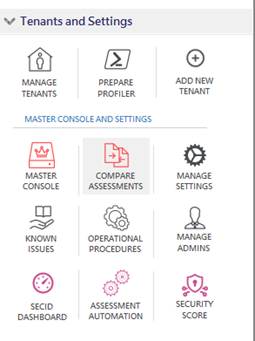
Once you are in Compare Assessments, click on “Load Assessment Views” button to select Assessment Views and then click on “Select and Load” button:

A security score can help you understand the overall security posture of a technology. For example, you can know current and initial score for Microsoft 365 and Azure Tenants for a single or multiple customers. To access the Security Score panel, expand Tenants & Settings and then click on “Security Score” button as shown below:

Once in Security Score panel, you can click on an Assessment View to show you the security score. When you click on the Assessment View it’s going to show you below information:
Assessment Scheduler can be utilized for continuous assessment. The Assessment Scheduler can be useful in following situations:
The Assessment Scheduler Profile can be created by going to Manage Setting and then creating a Schedule from the Schedules tab. Once the Scheduler Profile has been created the Scheduler Profiles will appear under “Scheduler Profiles” section in the left pane as shown below:

As you can see for each execution it creates a date and time sub-node for each Scheduler Profile so you can see the status of technology on that particular day.
It is also possible to look at the existing code that SmartProfiler uses to execute a test. You can easily modify to suite your requirements.
In case you need to customize Impact and Recommendation text, the SmartProfiler Enterprise Edition can be used to do so. All you need to do is go to Manage Modules and then click on a module to modify its Impact and Recommendations text.
SecID Dashboard can be used to show the Initial Score and Current Score for each technology. To access SecID Dashboard, expand the Tenants & Settings section in the left section and then click on “SecID Dashboard” button as shown below:
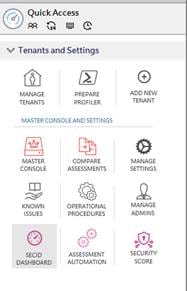
When you click on the SecID Dashboard, it will show you Initial and Current score for each technology that you have configured in SmartProfiler-SecID. You are required to configure technology Assessment Views in SecID Dashboard configuration screen so you can see the score for desired technology.
SmartProfiler Product Family also has Fixer Tools for some technologies that can be used to fix the issues. However, it is important to understand that Fixer Tools can only be used with SmartProfiler-SecID Enterprise Edition. The Fixer Tool is a separate tool and is licensed separately. Fixer tools for technology can provide the following benefits:
The Enterprise Edition of SmartProfiler-SecID has been designed to keep all stakeholders in mind. Whether you have a security team, compliance team, IT Managers, IT Architects, or other team, the SmartProfiler-SecID has been designed in such a way that everyone with proper permissions can see the dashboard for all or specific technology in SmartProfiler to understand the security posture of the technologies.
The process includes the following components:
As you can see in the screenshot above, the SmartProfiler-SecID Enterprise Edition performs continuous assessment for all managed technologies and send the results to the Master Console. The Master Console access can be given to IT Stakeholders including your customers so they can view the assessment results and overall security posture of a technology. For example, if you have a customer who needs to see the Assessment results for his M365 Tenant, you can create an assessment view and grant access to your customer. Your customer can only see the results for M365 Tenant and not able to manage or view any other assessment views.
SmartProfiler-SecID Enterprise Edition supports CIS and NIST Assessments. In other words, we use the tests designed by CIS and leverage tests in SmartProfiler to execute and help you with the results. While CIS has designed the security benchmark for technologies, not all the tests are covered. To ensure all aspects of technology are assessed, we leverage SmartProfiler Tests for applicable technology. For example, for Microsoft 365 CIS Assessments, we have 119 SmartProfiler Tests. Similarly, for Azure we have an additional 54 tests and for AWS CIS Assessment we have additional 54 SmartProfiler Tests for RDS. The table below lists the technologies which have been expanded to make sure all components of a technology are assessed. In the Test Type column, you can see CIS and SmartProfiler.
| Technology | Test Type | # Of Tests |
| Microsoft 365 CIS v3.1.0 | CIS | 131 |
| Microsoft 365 CIS v3.1.0 | SmartProfiler | 104 |
| Microsoft Azure CIS v2.1.0 | CIS | 149 |
| Microsoft Azure CIS v2.1.0 | SmartProfiler | 130 |
| Microsoft Azure Entra ID SP v1.0 | CIS | 0 |
| Microsoft Azure Entra ID SP v1.0 | SmartProfiler | 31 |
| Microsoft Azure Infra SP v1.0 | CIS | 0 |
| Microsoft Azure Infra SP v1.0 | SmartProfiler | 25 |
| Azure Database Services CIS v1.0.0 | CIS | 27 |
| Azure Database Services CIS v1.0.0 | SmartProfiler | 1 |
| Azure Compute Services CIS v1.0.0 | CIS | 24 |
| Azure Compute Services CIS v1.0.0 | SmartProfiler | 31 |
| Azure Kubernetes Service CIS v1.5.0 | CIS | 43 |
| Azure Kubernetes Service CIS v1.5.0 | SmartProfiler | 0 |
| SQL Server 2019 CIS v1.4.0 | CIS | 47 |
| SQL Server 2019 CIS v1.4.0 | SmartProfiler | 0 |
| SQL Server 2022 CIS v1.1.0 | CIS | 47 |
| SQL Server 2022 CIS v1.1.0 | SmartProfiler | 0 |
| Microsoft AVD Assessment | CIS | 0 |
| Microsoft AVD Assessment | SmartProfiler | 567 |
| Intune-iOS BYOD CIS v1.1.0 | CIS | 41 |
| Intune-iOS BYOD CIS v1.1.0 | SmartProfiler | 0 |
| Intune-iOS ORG CIS v1.1.0 | CIS | 60 |
| Intune-iOS ORG CIS v1.1.0 | SmartProfiler | 0 |
| Windows Server 2016 CIS v3.0.0 | CIS | 421 |
| Windows Server 2016 CIS v3.0.0 | SmartProfiler | 0 |
| Windows Server 2019 CIS v3.0.1 | CIS | 421 |
| Windows Server 2019 CIS v3.0.1 | SmartProfiler | 0 |
| Windows Server 2022 CIS v3.0.0 | CIS | 421 |
| Windows Server 2022 CIS v3.0.0 | SmartProfiler | 0 |
| Intune for Windows 10 CIS v3.0.1 | CIS | 411 |
| Intune for Windows 10 CIS v3.0.1 | SmartProfiler | 0 |
| Intune for Windows 11 CIS v3.0.1 | CIS | 411 |
| Intune for Windows 11 CIS v3.0.1 | SmartProfiler | 0 |
| Microsoft Windows 10 CIS v3.0.0 | CIS | 539 |
| Microsoft Windows 10 CIS v3.0.0 | SmartProfiler | 0 |
| Microsoft Windows 11 CIS v3.0.0 | CIS | 539 |
| Microsoft Windows 11 CIS v3.0.0 | SmartProfiler | 0 |
| Exchange Server 2016 CIS v1.0.0 | CIS | 55 |
| Exchange Server 2016 CIS v1.0.0 | SmartProfiler | 0 |
| Exchange Server 2019 CIS v1.0.0 | CIS | 55 |
| Exchange Server 2019 CIS v1.0.0 | SmartProfiler | 0 |
| SharePoint Server 2019 CIS v1.0.0 | CIS | 55 |
| SharePoint Server 2019 CIS v1.0.0 | SmartProfiler | 0 |
| Microsoft IIS 10 CIS v1.2.1 | CIS | 55 |
| Microsoft IIS 10 CIS v1.2.1 | SmartProfiler | 0 |
| Microsoft Edge CIS v3.0.0 | CIS | 122 |
| Microsoft Edge CIS v3.0.0 | SmartProfiler | 0 |
| Microsoft DHCP | CIS | 0 |
| Microsoft DHCP | SmartProfiler | 23 |
| Google Chrome CIS v3.0.0 | CIS | 89 |
| Google Chrome CIS v3.0.0 | SmartProfiler | 0 |
| Amazon Complete CIS v3.0.0 | CIS | 252 |
| Amazon Complete CIS v3.0.0 | SmartProfiler | 80 |
| Amazon Web Services CIS v3.0.0 | CIS | 62 |
| Amazon Web Services CIS v3.0.0 | SmartProfiler | 0 |
| AWS Compute Services CIS v1.0.0 | CIS | 53 |
| AWS Compute Services CIS v1.0.0 | SmartProfiler | 0 |
| AWS Database Services CIS v1.0.0 | CIS | 82 |
| AWS Database Services CIS v1.0.0 | SmartProfiler | 0 |
| AWS Storage Services CIS v1.0.0 | CIS | 56 |
| AWS Storage Services CIS v1.0.0 | SmartProfiler | 0 |
| AWS End User Compute CIS v1.1.0 | CIS | 34 |
| AWS End User Compute CIS v1.1.0 | SmartProfiler | 0 |
| VMWare ESXi 8.0 CIS v1.1.0 | CIS | 132 |
| VMWare ESXi 8.0 CIS v1.1.0 | SmartProfiler | 7 |
| Ubuntu Linux 22.04 LTS CIS v2.0.0 | CIS | 300 |
| Ubuntu Linux 22.04 LTS CIS v2.0.0 | SmartProfiler | 0 |
| Ubuntu Linux 20.04 LTS CIS v2.0.0 | CIS | 285 |
| Ubuntu Linux 20.04 LTS CIS v2.0.0 | SmartProfiler | 0 |
| CentOS Linux 8 CIS v1.0.0.1 | CIS | 285 |
| CentOS Linux 8 CIS v1.0.0.1 | SmartProfiler | 0 |
| Debian Linux 12 CIS v1.0.1 | CIS | 298 |
| Debian Linux 12 CIS v1.0.1 | SmartProfiler | 0 |
| Red Hat Enterprise Linux 9 CIS v2.0.0 | CIS | 297 |
| Red Hat Enterprise Linux 9 CIS v2.0.0 | SmartProfiler | 0 |
| NGINX CIS v2.1.0 | CIS | 58 |
| NGINX CIS v2.1.0 | SmartProfiler | 0 |
| Oracle Database 18c CIS v1.1.0 | CIS | 115 |
| Oracle Database 18c CIS v1.1.0 | SmartProfiler | 0 |
| Oracle Database 19c CIS v1.2.0 | CIS | 113 |
| Oracle Database 19c CIS v1.2.0 | SmartProfiler | 0 |
| Google Cloud CIS v3.0.0 | CIS | 84 |
| Google Cloud CIS v3.0.0 | SmartProfiler | 0 |
| FortiGate 7.0 CIS v1.3.0 | CIS | 56 |
| FortiGate 7.0 CIS v1.3.0 | SmartProfiler | 0 |
| Apache Cassandra 4.0 CIS v1.0.0 | CIS | 20 |
| Apache Cassandra 4.0 CIS v1.0.0 | SmartProfiler | 0 |
| Apache Tomcat 9 CIS v1.2.0 | CIS | 62 |
| Apache Tomcat 9 CIS v1.2.0 | SmartProfiler | 0 |
| Apache HTTP Server 2.4 CIS v2.1.0 | CIS | 87 |
| Apache HTTP Server 2.4 CIS v2.1.0 | SmartProfiler | 0 |
| MariaDB 10.11 CIS v1.0.0 | CIS | 75 |
| MariaDB 10.11 CIS v1.0.0 | SmartProfiler | 0 |
| F5 Networks CIS v1.0.0 | CIS | 29 |
| F5 Networks CIS v1.0.0 | SmartProfiler | 0 |
| Oracle Cloud INFRA CIS v2.0.0 | CIS | 51 |
| Oracle Cloud INFRA CIS v2.0.0 | SmartProfiler | 0 |
| Cisco IOS 17.x CIS v2.0.0 | CIS | 95 |
| Cisco IOS 17.x CIS v2.0.0 | SmartProfiler | 0 |
| IBM Cloud CIS v1.1.0 | CIS | 68 |
| IBM Cloud CIS v1.1.0 | SmartProfiler | 0 |
SmartProfiler supports all CIS Benchmarks and other technologies which are not covered by CIS and other security organizations. For example, SmartProfiler also supports Microsoft Active Directory, Azure Virtual Desktop Assessments and DHCP Server which are not available in CIS and NIST CSF 2.0 frameworks. Here is a list of technologies supported by SmartProfiler. Please note SmartProfiler provides support for both Microsoft and non-Microsoft Technologies.
Note: All of the technologies are updated every month to ensure SmartProfiler supports latest CIS benchmark.
| Microsoft 365 CIS v4.0.0 | Microsoft FSLogix Assessment | Exchange Server 2016 CIS v1.0.0 | Google Chrome CIS v3.0.0 | Fortigate 7.0 CIS v1.3.0 |
| Microsoft Active Directory | InTune-iOS BYOD CIS v1.1.0 | SharePoint Server 2019 CIS v1.0.0 | VMWare ESXi 8.0 CIS v1.1.0 | Apache Cassandra 4.0 CIS v1.0.0 |
| Microsoft Azure CIS v2.1.0 | InTune-iOS ORG CIS v1.1.0 | Microsoft IIS 10 CIS v1.2.1 | Ubuntu Linux 22.04 LTS CIS v2.0.0 | Apache Tomcat 9 CIS v1.2.0 |
| Microsoft Azure Entra ID SP v1.0 | Windows Server 2016 CIS v3.0.0 | Microsoft Edge CIS v3.0.0 | Ubuntu Linux 20.04 LTS CIS v2.0.0 | Apache HTTP Server 2.4 CIS v2.1.0 |
| Microsoft Azure Infra SP v1.0 | Windows Server 2019 CIS v3.0.1 | Microsoft DHCP | CentOS Linux 8 CIS v1.0.0.1 | MariaDB 10.11 CIS v1.0.0 |
| Azure Database Services CIS v1.0.0 | Windows Server 2022 CIS v3.0.0 | AWS Complete CIS v3.0.0 | Debian Linux 12 CIS v1.0.1 | F5 Networks CIS v1.0.0 |
| Azure Compute Services CIS v1.0.0 | Intune for Windows 10 CIS v3.0.1 | AWS Web Services CIS v3.0.0 | Red Hat Enterprise Linux 9 CIS v2.0.0 | Oracle Cloud INFRA CIS v2.0.0 |
| Azure Kubernetes Service CIS v1.5.0 | Intune for Windows 11 CIS v3.0.1 | AWS Compute Services CIS v1.0.0 | NGINX CIS v2.1.0 | Cisco IOS 17.x CIS v2.0.0 |
| SQL Server 2019 CIS v1.4.0 | Microsoft Windows 10 CIS v3.0.0 | AWS Database Services CIS v1.0.0 | Oracle Database 18c CIS v1.1.0 | IBM Cloud CIS v1.1.0 |
| SQL Server 2022 CIS v1.1.0 | Microsoft Windows 11 CIS v3.0.0 | AWS Storage Services CIS v1.0.0 | Oracle Database 19c CIS v1.2.0 | |
| Microsoft AVD Assessment | Exchange Server 2019 CIS v1.0.0 | AWS End User Compute CIS v1.1.0 | Google Cloud CIS v3.0.0 | |
It is important to understand the objective of each technology that is supported by the SmartProfiler. The below section explains the objective of each technology supported by the SmartProfiler:
Security Frameworks: For Microsoft Active Directory, SmartProfiler-SecID supports tests suggested by MITRE, ANSSI and Microsoft.
CIS Benchmarks: NA
Objective: It’s crucial to carry out an advanced assessment before purchasing any monitoring software for Microsoft Active Directory to make sure the tool can keep an eye on all the problems the assessment tool finds—something the SmartProfiler for Active Directory does! Not every assessment tool examines every facet of Active Directory environments. SmartProfiler is designed to uncover issues in On-Premises Active Directory. Objective is to check all Active Directory Components to ensure they are configured correctly and there is no security risks.
Security Frameworks: CIS v3.1.0, CIS v4.0 and NIST CSF 2.0
CIS Benchmarks: Microsoft 365 Foundation v3.1.0 and Microsoft 365 Foundation v4.0
Objective: Objective is to check all Microsoft 365 Services including SharePoint, ExchangeOnline, OneDrive, Teams, Defender and other services.
Security Frameworks: CIS and NIST CSF 2.0
CIS Benchmarks: Azure Web Services 3.0, Azure Storage CIS v1.0
Objective: Ability to perform complete Azure CIS Assessment covering all Azure CIS benchmarks.
Security Frameworks: CIS and NIST CSF 2.0
CIS Benchmarks: Azure Web Services 3.0, Azure Storage CIS v1.0
Objective: Ability to perform complete Azure CIS Assessment covering all Azure CIS benchmarks.
The objective for other technologies can be seen in the table below:
| Objective | Services/Components Covered | |
| Technology | ||
| Microsoft 365 CIS v3.1.0 | Performs CIS v3.1.0 assessment for M365 Tenants and includes additional tests. Additional tests are recommended for M365 environments. | SharePoint, ExchangeOnline, Teams, OneDrive, Defender, and other M365 components. |
| Microsoft Active Directory | Performs Assessment based on MITRE, ANSSI, and CIS Frameworks. Also includes tests recommended by STIG and NIST. | Multiple AD Domains and all Domain Controllers in an AD Forest |
| Microsoft Azure CIS v2.1.0 | Performs complete assessment of Azure Tenants including Storage, Compute, AKS, other CIS Benchmarks in a single Azure Assessment. | Database, Storage, Compute, Entra ID, Azure Infra, AKS. – Covers all other Azure CIS Assessments. |
| Microsoft Azure Entra ID SP v1.0 | Performs only Entra ID Assessment for an Azure Tenant | Covers only Azure Entra ID |
| Microsoft Azure Infra SP v1.0 | Performs Microsoft Azure-Infra Assessment including checking SSO in on-prem Active Directory | Covers Azure Infra, SSO, and On-Prem Active Directory Tests related to SSO |
| Azure Database Services CIS v1.0.0 | Performs Database Assessment for Azure Tenants | Covers only Azure Database including MySQL, Postgres |
| Azure Compute Services CIS v1.0.0 | Performs complete assessment for Azure Compute Environment | Covers only Azure Compute including Virtual Machines and other Compute Resources |
| Azure Kubernetes Service CIS v1.5.0 | Performs AKS Assessment for Azure Tenants | Azure AKS Service |
| SQL Server 2019 CIS v1.4.0 | Performs CIS Assessment for SQL Servers running 2019. Unlimited SQL Instances are supported. | SQL Server 2019 |
| SQL Server 2022 CIS v1.1.0 | Performs CIS Assessment for SQL Servers running 2022. Unlimited SQL Instances are supported. | SQL Server 2022 |
| Microsoft AVD Assessment | Performs VDI Assessment to improve performance of AVD Environment. Unlimited Host Pools are supported. | Azure AVD Tenant. |
| Microsoft FSLogix Assessment | Performs FSLogix Assessment to improve performance of AVD Environment. | FSLogix Current Versions |
| InTune-iOS BYOD CIS v1.1.0 | Performs CIS InTune Assessment for iOS Unmanaged Devices (non-Corporate Devices). | iOS Devices |
| InTune-iOS ORG CIS v1.1.0 | Performs CIS InTune Assessment for iOS Managed Devices (Corporate Devices). | iOS Devices |
| Windows Server 2016 CIS v3.0.0 | Performs CIS Assessment for Windows Server 2016. | Domain Controllers Member Servers |
| Windows Server 2019 CIS v3.0.1 | Performs CIS Assessment for Windows Server 2019. | Domain Controllers Member Servers |
| Windows Server 2022 CIS v3.0.0 | Performs CIS Assessment for Windows Server 2022. | Domain Controllers Member Servers |
| Intune for Windows 10 CIS v3.0.1 | Performs CIS Assessment for Windows 10. Can check Windows 10 Intune Settings Status on multiple computers. Assessment can also check if CIS settings are configured in the Intune Admin Center. | Domain Joined Machines |
| Intune for Windows 11 CIS v3.0.1 | Performs CIS Assessment for Windows 11. Can check Windows 11 Intune Settings Status on multiple computers. Assessment can also check if CIS settings are configured in the Intune Admin Center. | Domain Joined Machines |
| Microsoft Windows 10 CIS v3.0.0 | Performs CIS Assessment for Windows 10. Can check Windows 10 AD GPO Settings Status on multiple computers. | Domain Joined Machines |
| Microsoft Windows 11 CIS v3.0.0 | Performs CIS Assessment for Windows 11. Can check Windows 11 AD GPO Settings Status on multiple computers. | Domain Joined Machines |
| Exchange Server 2016 CIS v1.0.0 | Performs CIS Assessment for Exchange Server running 2016 in On-Prem. | Exchange Servers. Unlimited Exchange Servers are supported. |
| Exchange Server 2019 CIS v1.0.0 | Performs CIS Assessment for Exchange Server running 2019 in On-Prem. | Exchange Servers. Unlimited Exchange Servers are supported. |
| SharePoint Server 2019 CIS v1.0.0 | RETIRING-Q1-2025 | RETIRING-Q1-2025 |
| Microsoft IIS 10 CIS v1.2.1 | Performs CIS Assessment on multiple IIS Servers. | IIS Servers running 10 or lower versions. Unlimited IIS Servers are supported. |
| Microsoft Edge CIS v3.0.0 | Performs CIS Assessment for Edge Browser on multiple Computers. | Edge Browser |
| Microsoft DHCP | Performs DHCP Assessment which includes executing custom tests designed for DHCP Environments. | All DHCP Servers joined to Active Directory Forest. Unlimited DHCP Servers are supported. |
| Google Chrome CIS v3.0.0 | Can check CIS Settings for Google Chrome on destination computers. | Chrome Browser |
| AWS Complete CIS v3.0.0 | Performs complete assessment of Amazon Services including other AWS CIS Assessments in a single AWS Assessment Package. Also includes RDS tests recommended by AWS Experts. | Web Services CIS 3.0.0, Compute Services CIS 1.0.0, Database Services CIS 1.0.0 and Storage Services CIS 1.0.0 |
| AWS Web Services CIS v3.0.0 | Performs complete assessment of Amazon Web Services Component. | AWS Web Service Component |
| AWS Compute Services CIS v1.0.0 | Performs complete assessment of Amazon Compute Services Component. | AWS Compute Component |
| AWS Database Services CIS v1.0.0 | Performs complete assessment of Amazon Database Services Component. | AWS Database Component |
| AWS Storage Services CIS v1.0.0 | Performs complete assessment of Amazon Storage Services Component. | AWS Storage Component |
| AWS End User Compute CIS v1.1.0 | Performs complete assessment of Amazon End User Compute including Workspace. | AWS End User Workspace |
| VMWare ESXi 8.0 CIS v1.1.0 | Perform complete assessment as per VMware CIS v1.1.0 and other tests included. | ESXi 8.0 and earlier hosts running in a vCenter. |
| Ubuntu Linux 22.04 LTS CIS v2.0.0 | Perform complete assessment of Ubuntu Linux Systems. Unlimited Ubuntu Systems are supported. | Ubuntu Linux 22.04 supported |
| Ubuntu Linux 20.04 LTS CIS v2.0.0 | Perform complete assessment of Ubuntu Linux Systems. Unlimited Ubuntu Systems are supported. | Ubuntu Linux 20.04 supported |
| CentOS Linux 8 CIS v1.0.0.1 | Perform complete assessment of CentOS Linux Systems. Unlimited CentOS Systems are supported. | CentOS Linux supported |
| Debian Linux 12 CIS v1.0.1 | Perform complete assessment of Debian Linux Systems. Unlimited Debian Systems are supported. | Debian Linux supported |
| Red Hat Enterprise Linux 9 CIS v2.0.0 | Performs Complete assessment as per CIS Benchmark. | Red Hat |
| NGINX CIS v2.1.0 | Performs Complete assessment as per CIS Benchmark. | NGINX CIS |
| Oracle Database 18c CIS v1.1.0 | Performs Complete assessment as per CIS Benchmark. | Oracle Database |
| Oracle Database 19c CIS v1.2.0 | Performs Complete assessment as per CIS Benchmark. | Oracle Database |
| Google Cloud CIS v3.0.0 | Performs Complete assessment as per CIS Benchmark. | Google Cloud |
| Fortigate 7.0 CIS v1.3.0 | Performs Complete assessment as per CIS Benchmark. Fortigate Health Check is also supported. | Fortigate supported |
| Apache Cassandra 4.0 CIS v1.0.0 | Performs Complete assessment as per CIS Benchmark. | Apache Cassandra |
| Apache Tomcat 9 CIS v1.2.0 | Performs Complete assessment as per CIS Benchmark. | Apache Tomcat |
| Apache HTTP Server 2.4 CIS v2.1.0 | Performs Complete assessment as per CIS Benchmark. | Apache HTTP |
| MariaDB 10.11 CIS v1.0.0 | Performs Complete assessment as per CIS Benchmark. | MariaDB 10.11 CIS |
| F5 Networks CIS v1.0.0 | Performs Complete assessment as per CIS Benchmark. | F5 Networks |
| Oracle Cloud INFRA CIS v2.0.0 | Performs Complete assessment as per CIS Benchmark. | Oracle Cloud |
| Cisco IOS 17.x CIS v2.0.0 | Performs Complete assessment as per CIS Benchmark. | Cisco IOS |
| IBM Cloud CIS v1.1.0 | Performs Complete assessment as per CIS Benchmark. | IBM Cloud |
Since we use tests designed by CIS, we would like to mention the automation rate by SmartProfiler for CIS and other benchmarks. It is important to note that CIS offers CIS CAT PRO – a tool designed to perform benchmark assessment for Microsoft and non-Microsoft Technologies. However, there are some limitations with the CIS CAT Pro as explained below:
Note: This document was written as on 05-02-2025. If you find any corrections in below table, please let us know and we will modify to ensure information highlighted in the document is accurate.
The table below lists the Automation rate for each technology supported by SmartProfiler-SecID. Automation rate plays an important role when doing assessment for the technology. It helps you understand how many resources you will need to complete the assessment.
| Technology | Test Type | Tests | Manual | Automated | Automated BY SP | SP Automation Rate | CIS Automation Rate |
| Microsoft 365 CIS v3.1.0 | CIS | 131 | 66 | 65 | 114 | 87.02% | 49.62% |
| Microsoft 365 CIS v3.1.0 | SmartProfiler | 104 | 1 | 103 | 103 | 99.04% | 99.04% |
| Microsoft Azure CIS v2.1.0 | CIS | 149 | 63 | 86 | 127 | 85.23% | 57.72% |
| Microsoft Azure CIS v2.1.0 | SmartProfiler | 130 | 46 | 84 | 84 | 64.62% | 64.62% |
| Microsoft Azure Entra ID SP v1.0 | CIS | 0 | 0 | 0 | 0 | 85.23% | 57.72% |
| Microsoft Azure Entra ID SP v1.0 | SmartProfiler | 31 | 0 | 31 | 31 | 100% | 100% |
| Microsoft Azure Infra SP v1.0 | CIS | 0 | 0 | 0 | 0 | 85.23% | 57.72% |
| Microsoft Azure Infra SP v1.0 | SmartProfiler | 25 | 5 | 20 | 20 | 80% | 80% |
| Azure Database Services CIS v1.0.0 | CIS | 27 | 8 | 19 | 27 | 100% | 70.37% |
| Azure Database Services CIS v1.0.0 | SmartProfiler | 1 | 0 | 1 | 1 | 100% | 100% |
| Azure Compute Services CIS v1.0.0 | CIS | 24 | 12 | 12 | 24 | 100% | 50% |
| Azure Compute Services CIS v1.0.0 | SmartProfiler | 31 | 4 | 27 | 27 | 87.10% | 87.10% |
| Azure Kubernetes Service CIS v1.5.0 | CIS | 43 | 12 | 31 | 43 | 100% | 72.09% |
| Azure Kubernetes Service CIS v1.5.0 | SmartProfiler | 0 | 0 | 0 | 0 | 87.10% | 87.10% |
| SQL Server 2019 CIS v1.4.0 | CIS | 47 | 10 | 37 | 47 | 100% | 78.72% |
| SQL Server 2019 CIS v1.4.0 | SmartProfiler | 0 | 0 | 0 | 0 | 87.10% | 87.10% |
| SQL Server 2022 CIS v1.1.0 | CIS | 47 | 10 | 37 | 0 | 0% | 78.72% |
| SQL Server 2022 CIS v1.1.0 | SmartProfiler | 0 | 0 | 0 | 0 | 87.10% | 87.10% |
| Microsoft AVD Assessment | CIS | 0 | 0 | 0 | 0 | 0% | 78.72% |
| Microsoft AVD Assessment | SmartProfiler | 0 | 0 | 0 | 0 | 87.10% | 87.10% |
| Microsoft FSLogix Assessment | CIS | 0 | 0 | 0 | 0 | 0% | 78.72% |
| Microsoft FSLogix Assessment | SmartProfiler | 0 | 0 | 0 | 0 | 87.10% | 87.10% |
| Microsoft FSLogix Assessment | CIS | 0 | 0 | 0 | 0 | 0% | 78.72% |
| Microsoft FSLogix Assessment | SmartProfiler | 0 | 0 | 0 | 0 | 87.10% | 87.10% |
| Microsoft FSLogix Assessment | CIS | 0 | 0 | 0 | 0 | 0% | 78.72% |
| Microsoft FSLogix Assessment | SmartProfiler | 0 | 0 | 0 | 0 | 87.10% | 87.10% |
| InTune-iOS BYOD CIS v1.1.0 | CIS | 41 | 41 | 0 | 41 | 100% | 0% |
| InTune-iOS BYOD CIS v1.1.0 | SmartProfiler | 0 | 0 | 0 | 0 | 87.10% | 87.10% |
| InTune-iOS ORG CIS v1.1.0 | CIS | 60 | 60 | 0 | 60 | 100% | 0% |
| InTune-iOS ORG CIS v1.1.0 | SmartProfiler | 0 | 0 | 0 | 0 | 87.10% | 87.10% |
| Windows Server 2016 CIS v3.0.0 | CIS | 421 | 0 | 0 | 0 | 0% | 0% |
| Windows Server 2016 CIS v3.0.0 | SmartProfiler | 0 | 0 | 0 | 0 | 87.10% | 87.10% |
| Windows Server 2019 CIS v3.0.1 | CIS | 421 | 0 | 0 | 0 | 0% | 0% |
| Windows Server 2019 CIS v3.0.1 | SmartProfiler | 0 | 0 | 0 | 0 | 87.10% | 87.10% |
| Windows Server 2022 CIS v3.0.0 | CIS | 421 | 0 | 0 | 0 | 0% | 0% |
| Windows Server 2022 CIS v3.0.0 | SmartProfiler | 0 | 0 | 0 | 0 | 87.10% | 87.10% |
| Intune for Windows 10 CIS v3.0.1 | CIS | 411 | 0 | 0 | 0 | 0% | 0% |
| Intune for Windows 10 CIS v3.0.1 | SmartProfiler | 0 | 0 | 0 | 0 | 87.10% | 87.10% |
| Intune for Windows 11 CIS v3.0.1 | CIS | 411 | 0 | 0 | 0 | 0% | 0% |
| Intune for Windows 11 CIS v3.0.1 | SmartProfiler | 0 | 0 | 0 | 0 | 87.10% | 87.10% |
| Microsoft Windows 10 CIS v3.0.0 | CIS | 539 | 0 | 0 | 0 | 0% | 0% |
| Microsoft Windows 10 CIS v3.0.0 | SmartProfiler | 0 | 0 | 0 | 0 | 87.10% | 87.10% |
| Microsoft Windows 11 CIS v3.0.0 | CIS | 539 | 0 | 0 | 0 | 0% | 0% |
| Microsoft Windows 11 CIS v3.0.0 | SmartProfiler | 0 | 0 | 0 | 0 | 87.10% | 87.10% |
| Exchange Server 2016 CIS v1.0.0 | CIS | 55 | 3 | 52 | 55 | 100% | 94.55% |
| Exchange Server 2016 CIS v1.0.0 | SmartProfiler | 0 | 0 | 0 | 0 | 87.10% | 87.10% |
| Exchange Server 2019 CIS v1.0.0 | CIS | 55 | 3 | 52 | 55 | 100% | 94.55% |
| Exchange Server 2019 CIS v1.0.0 | SmartProfiler | 0 | 0 | 0 | 0 | 87.10% | 87.10% |
| SharePoint Server 2019 CIS v1.0.0 | CIS | 55 | 3 | 52 | 55 | 100% | 94.55% |
| SharePoint Server 2019 CIS v1.0.0 | SmartProfiler | 0 | 0 | 0 | 0 | 87.10% | 87.10% |
| Microsoft IIS 10 CIS v1.2.1 | CIS | 55 | 14 | 41 | 48 | 87.27% | 74.55% |
| Microsoft IIS 10 CIS v1.2.1 | SmartProfiler | 0 | 0 | 0 | 0 | 87.10% | 87.10% |
| Microsoft Edge CIS v3.0.0 | CIS | 122 | 0 | 0 | 0 | 0% | 0% |
| Microsoft Edge CIS v3.0.0 | SmartProfiler | 0 | 0 | 0 | 0 | 87.10% | 87.10% |
| Microsoft DHCP | CIS | 0 | 0 | 0 | 0 | 0% | 0% |
| Microsoft DHCP | SmartProfiler | 23 | 0 | 23 | 23 | 100% | 100% |
| Google Chrome CIS v3.0.0 | CIS | 89 | 10 | 79 | 89 | 100% | 88.76% |
| Google Chrome CIS v3.0.0 | SmartProfiler | 0 | 0 | 0 | 0 | 100% | 100% |
| Amazon Complete CIS v3.0.0 | CIS | 252 | 216 | 36 | 252 | 100% | 14.29% |
| Amazon Complete CIS v3.0.0 | SmartProfiler | 80 | 0 | 37 | 37 | 46.25% | 46.25% |
| Amazon Web Services CIS v3.0.0 | CIS | 62 | 28 | 34 | 62 | 100% | 54.84% |
| Amazon Web Services CIS v3.0.0 | SmartProfiler | 0 | 0 | 0 | 0 | 46.25% | 46.25% |
| AWS Compute Services CIS v1.0.0 | CIS | 53 | 51 | 2 | 53 | 100% | 3.77% |
| AWS Compute Services CIS v1.0.0 | SmartProfiler | 0 | 0 | 0 | 0 | 46.25% | 46.25% |
| AWS Database Services CIS v1.0.0 | CIS | 82 | 82 | 0 | 82 | 100% | 0% |
| AWS Database Services CIS v1.0.0 | SmartProfiler | 0 | 0 | 0 | 0 | 46.25% | 46.25% |
| AWS Storage Services CIS v1.0.0 | CIS | 56 | 56 | 0 | 56 | 100% | 0% |
| AWS Storage Services CIS v1.0.0 | SmartProfiler | 0 | 0 | 0 | 0 | 46.25% | 46.25% |
| AWS End User Compute CIS v1.1.0 | CIS | 34 | 25 | 9 | 34 | 100% | 26.47% |
| AWS End User Compute CIS v1.1.0 | SmartProfiler | 0 | 0 | 0 | 0 | 46.25% | 46.25% |
| VMWare ESXi 8.0 CIS v1.1.0 | CIS | 132 | 93 | 39 | 116 | 87.88% | 29.55% |
| VMWare ESXi 8.0 CIS v1.1.0 | SmartProfiler | 7 | 0 | 7 | 7 | 100% | 100% |
| Ubuntu Linux 22.04 LTS CIS v2.0.0 | CIS | 300 | 25 | 275 | 300 | 100% | 91.67% |
| Ubuntu Linux 22.04 LTS CIS v2.0.0 | SmartProfiler | 0 | 0 | 0 | 0 | 100% | 100% |
| Ubuntu Linux 20.04 LTS CIS v2.0.0 | CIS | 285 | 30 | 255 | 285 | 100% | 89.47% |
| Ubuntu Linux 20.04 LTS CIS v2.0.0 | SmartProfiler | 0 | 0 | 0 | 0 | 100% | 100% |
| CentOS Linux 8 CIS v1.0.0.1 | CIS | 285 | 30 | 255 | 285 | 100% | 89.47% |
| CentOS Linux 8 CIS v1.0.0.1 | SmartProfiler | 0 | 0 | 0 | 0 | 100% | 100% |
| Debian Linux 12 CIS v1.0.1 | CIS | 298 | 25 | 273 | 298 | 100% | 91.61% |
| Debian Linux 12 CIS v1.0.1 | SmartProfiler | 0 | 0 | 0 | 0 | 100% | 100% |
| Red Hat Enterprise Linux 9 CIS v2.0.0 | CIS | 297 | 28 | 269 | 297 | 100% | 90.57% |
| Red Hat Enterprise Linux 9 CIS v2.0.0 | SmartProfiler | 0 | 0 | 0 | 0 | 100% | 100% |
| NGINX CIS v2.1.0 | CIS | 58 | 25 | 33 | 58 | 100% | 56.90% |
| NGINX CIS v2.1.0 | SmartProfiler | 0 | 0 | 0 | 0 | 100% | 100% |
| Oracle Database 18c CIS v1.1.0 | CIS | 115 | 9 | 106 | 115 | 100% | 92.17% |
| Oracle Database 18c CIS v1.1.0 | SmartProfiler | 0 | 0 | 0 | 0 | 100% | 100% |
| Oracle Database 19c CIS v1.2.0 | CIS | 113 | 8 | 105 | 113 | 100% | 92.92% |
| Oracle Database 19c CIS v1.2.0 | SmartProfiler | 0 | 0 | 0 | 0 | 100% | 100% |
| Google Cloud CIS v3.0.0 | CIS | 84 | 13 | 71 | 84 | 100% | 84.52% |
| Google Cloud CIS v3.0.0 | SmartProfiler | 0 | 0 | 0 | 0 | 100% | 100% |
| Fortigate 7.0 CIS v1.3.0 | CIS | 56 | 29 | 27 | 56 | 100% | 48.21% |
| Fortigate 7.0 CIS v1.3.0 | SmartProfiler | 0 | 0 | 0 | 0 | 100% | 100% |
| Apache Cassandra 4.0 CIS v1.0.0 | CIS | 20 | 9 | 11 | 20 | 100% | 55% |
| Apache Cassandra 4.0 CIS v1.0.0 | SmartProfiler | 0 | 0 | 0 | 0 | 100% | 100% |
| Apache Tomcat 9 CIS v1.2.0 | CIS | 62 | 27 | 35 | 62 | 100% | 56.45% |
| Apache Tomcat 9 CIS v1.2.0 | SmartProfiler | 0 | 0 | 0 | 0 | 100% | 100% |
| Apache HTTP Server 2.4 CIS v2.1.0 | CIS | 87 | 14 | 73 | 87 | 100% | 83.91% |
| Apache HTTP Server 2.4 CIS v2.1.0 | SmartProfiler | 0 | 0 | 0 | 0 | 100% | 100% |
| MariaDB 10.11 CIS v1.0.0 | CIS | 75 | 31 | 44 | 75 | 100% | 58.67% |
| MariaDB 10.11 CIS v1.0.0 | SmartProfiler | 0 | 0 | 0 | 0 | 100% | 100% |
| F5 Networks CIS v1.0.0 | CIS | 29 | 21 | 8 | 29 | 100% | 27.59% |
| F5 Networks CIS v1.0.0 | SmartProfiler | 0 | 0 | 0 | 0 | 100% | 100% |
| Oracle Cloud INFRA CIS v2.0.0 | CIS | 51 | 16 | 35 | 51 | 100% | 68.63% |
| Oracle Cloud INFRA CIS v2.0.0 | SmartProfiler | 0 | 0 | 0 | 0 | 100% | 100% |
| Cisco IOS 17.x CIS v2.0.0 | CIS | 95 | 0 | 95 | 95 | 100% | 100% |
| Cisco IOS 17.x CIS v2.0.0 | SmartProfiler | 0 | 0 | 0 | 0 | 100% | 100% |
| IBM Cloud CIS v1.1.0 | CIS | 68 | 57 | 11 | 68 | 100% | 16.18% |
| IBM Cloud CIS v1.1.0 | SmartProfiler | 0 | 0 | 0 | 0 | 100% | 100% |
SmartProfiler gets a revision every month from 25th to 30th or end of every month and following updates are made:
Any bugs/issues reported by the customer.
Each assessment that you do in SmartProfiler can help you generate three types of reports; Word Summary, Excel Summary and Business Executive Reports. The word report contains more details on the issue including Impact and recommendations to fix the issues. The Word Report also includes CIS Assessment Table status whether the test is configured according to CIS or not. The Excel Summary contains the list of affected objects for technical people. Technical Team can pick the affected objects/items from the Excel Summary to be included in the Change Sheet. The business Executive Summary is designed for MSPs, MSSPs, Service Providers and internal IT Teams to showcase results/information generated by SmartProfiler as a high level. Basically, the executive summary will tell overall Security Posture for technology and other details as necessary for business executives.
SmartProfiler lets you see the tests that it executes for each technology. For example, you can see all tests SmartProfiler executes as part of the Microsoft 365 CIS Assessment. To explore the tests for a specific technology, expand Explore CIS/NIST Assessments section in the left pane, expand the technology and then click on “Assessment Requirements” node as shown in the screenshot below:
When you click on the “Explore Tests” node, the screen will show tests available for selected technology as shown below:

The requirements before the assessment can be executed depend on the technology. For example, for Active Directory Assessment, SmartProfiler requires Domain Admin if there is a single AD domain running in an Active Directory Forest and Enterprise Admins if child domains in an Active Directory Forest. Similarly, for Microsoft 365 CIS Assessment, SmartProfiler supports two connection methods; STORED-CRED and Microsoft Login Prompt.
When it comes to requirements for executing assessments, it depends on the destination technology. SmartProfiler lets you see the requirements and explore the tests for each technology. To see the Assessment Requirements for each technology, expand Explore CIS/NIST Assessments section in the left pane, expand the technology and then click on “Assessment Requirements” node as shown in the screenshot below:

When you click on “Assessment Requirements”, SmartProfiler will show the Assessment Requirements with questions and answers that might be helpful to you:

SmartProfiler supports two or more connection methods for each technology; STORED-CRED, Locally Logged on and Microsoft Login Prompt as explained below:
SmartProfiler Licenses are charged per Tenant per year. Please contact [email protected] to learn more about the pricing.
Some of the technologies in SmartProfiler require necessary permissions to the target before the assessment can be executed. For example, for performing an assessment for Microsoft Azure CIS, the SmartProfiler requires an Entra App to be created, and necessary application permissions are assigned.
Microsoft Cloud Technologies Permissions
Below table lists the permissions required for Microsoft Cloud Technologies before the assessment can be executed successfully.
| Permission | Type | M365 | Azure | Entra ID | Azure Infra | Azure DB | Azure Compute | Intune iOS | Intune for Windows 11 CIS v3.0.1 | Microsoft Windows 10 CIS v3.0.0 |
| AccessReview.Read.All | AP | X | NA | NA | NA | NA | NA | NA | NA | NA |
| AuditLog.Read.All | AP | X | X | NA | NA | X | X | NA | NA | NA |
| AuthenticationContext.Read.All | AP | X | X | NA | NA | X | X | NA | NA | NA |
| Directory.Read.All | AP | X | X | X | X | X | X | NA | NA | NA |
| DirectoryRecommendations.Read.All | AP | X | X | NA | NA | X | X | NA | NA | NA |
| IdentityProvider.Read.All | AP | X | X | X | X | X | X | NA | NA | NA |
| IdentityRiskyUser.Read.All | AP | X | X | NA | NA | X | X | NA | NA | NA |
| MailboxSettings.Read | AP | X | NA | NA | NA | NA | NA | NA | NA | NA |
| MultiTenantOrganization.Read.All | AP | X | NA | NA | NA | NA | NA | NA | NA | NA |
| MultiTenantOrganization.ReadBasic.All | AP | X | X | NA | NA | X | X | NA | NA | NA |
| OnPremDirectorySynchronization.Read.All | AP | X | X | X | X | X | X | NA | NA | NA |
| Organization.Read.All | AP | X | X | NA | NA | X | X | NA | NA | NA |
| Policy.Read.All | AP | X | X | X | X | X | X | NA | NA | NA |
| Policy.Read.ConditionalAccess | AP | X | X | NA | NA | X | X | NA | NA | NA |
| RoleManagement.Read.All | AP | X | X | X | X | X | X | NA | NA | NA |
| SecurityActions.Read.All | AP | X | NA | NA | NA | NA | NA | NA | NA | NA |
| SecurityEvents.Read.All | AP | X | NA | X | X | NA | NA | NA | NA | NA |
| SharePointTenantSettings.Read.All | AP | X | NA | NA | NA | NA | NA | NA | NA | NA |
| ThreatIndicators.Read.All | AP | X | NA | NA | NA | NA | NA | NA | NA | NA |
| User.Read | AP | X | X | NA | NA | X | X | NA | NA | NA |
| User.Read.All | AP | X | X | X | X | X | X | NA | NA | NA |
| UserAuthenticationMethod.Read.All | AP | X | X | X | X | X | X | NA | NA | NA |
| RoleAssignmentSchedule.Read.Directory | AP | X | X | X | X | X | X | NA | NA | NA |
| DeviceManagementManagedDevices.Read.All | AP | NA | NA | NA | NA | NA | NA | X | X | X |
| DeviceManagementApps.Read.All | AP | NA | NA | NA | NA | NA | NA | X | X | X |
| DeviceManagementServiceConfig.Read.All | AP | NA | NA | NA | NA | NA | NA | X | X | X |
| DeviceManagementConfiguration.Read.All | AP | NA | NA | NA | NA | NA | NA | X | X | X |
| Application.Read.All | AP | X | NA | NA | NA | NA | NA | NA | NA | NA |
| GroupMember.Read.All | AP | NA | NA | NA | NA | NA | NA | NA | NA | NA |
| User.ReadBasic.All | AP | NA | NA | NA | NA | NA | NA | NA | NA | NA |
| Reader | Role | X | X | X | X | X | X | NA | NA | NA |
| Key Vault Reader | Role | NA | X | NA | NA | X | X | NA | NA | NA |
| Reader and Data Access | Role | NA | X | NA | NA | X | X | NA | NA | NA |
| Compliance Administrator | M365 Role | X | NA | NA | NA | NA | NA | NA | NA | NA |
| Compliance Data Administrator | M365 Role | X | NA | NA | NA | NA | NA | NA | NA | NA |
| Global Reader | M365 Role | X | NA | NA | NA | NA | NA | NA | NA | NA |
| SharePoint Administrator | M365 Role | X | NA | NA | NA | NA | NA | NA | NA | NA |
When a customer Installs and run the Assessment for Microsoft Active Directory, Microsoft 365, and Microsoft AVD, the data will be kept on the SmartProfiler computer. The SmartProfiler computer will have an internal database that will be used by the SmartProfiler Agents for processing. When an assessment report is generated, the process pulls the data located on the SmartProfiler computer.
At no point during the assessment the tool will connect to Public Internet or any FTP endpoints unless it is required by the target technology. All data is secured at rest using AES 256-bit encryption. Service account passwords and password hashes (while already encrypted at-rest) are additionally encrypted with AES 256-bit encryption using Microsoft Encryption.
The following table provides a list of frequently asked questions for Data Impact and Modeling.
| Does this solution require the use of company data? | NO |
| Does this solution require the use of employee data? | NO |
| Does this solution move large amounts of data? | NO |
| Does this solution introduce a new data model? | NO |
| Policy | Compliance | Reason for non-compliance |
| Access Control Policy | Compliant | |
| Asset Management Policy | Not Applicable | |
| Availability Management Policy | Compliant | |
| Budget and Accounting for IT Services Policy | Not Applicable | |
| Compliance Policy | Not Applicable | |
| Contact with Authorities and Special Interest Groups | Not Applicable | |
| Data Protection Policy | Compliant | |
| Email Security Policy | Compliant | |
| End User Security Policy | Not Applicable | No end user data is touched. |
| HR Information Security Policy | Not Applicable | |
| Information Security Incident and Problem Management Policy | Not Applicable | |
| Information Security Management System Policy | Not Applicable | |
| Information Systems Acquisition, Development, and Maintenance Policy | Not Applicable | |
| ISMS Manual | Not Applicable | |
| IT Service Continuity Policy | Not Applicable | |
| Network Security Policy | Not Applicable | |
| Operations Management Policy | Not Applicable | |
| Physical and Environmental Security Policy | Not Applicable | |
| Risk Manual | Not Applicable |
Q. Does SmartProfiler perform any write operations to Target?
A. No, SmartProfiler is a read-only product and at no point during assessment a write operation is performed to the target.
Q. Does SmartProfiler connect to Public Internet for sending any information to DynamicPacks?
A. SmartProfiler doesn’t connect to DynamicPacks or any other Public Endpoints for storing data. Even the license file is provided offline for activation.
Q. Does SmartProfiler use PowerShell Designed by Microsoft?
A. SmartProfiler uses PowerShell Modules designed by Microsoft. All PowerShell Modules used by SmartProfiler are available on PowerShell Gallery which is managed by Microsoft.
Q. Can I see what all PowerShell Scripts are executed as part of SmartProfiler execution?
A. We provide “Manage Modules” tab as part of SmartProfiler that can be used to check PowerShell code for each test. However, “Manage Modules” tab is only available in Licensed Version.
Q. What data is stored in CSV files generated by SmartProfiler?
A. CSV files only contain “Affected objects” data. For example, in the case of Microsoft 365 if a test needs to check list of users or admins that do not have MFA enabled then CSV file will only contain those affected users/admins. Similarly, if AD Assessment for SmartProfiler finds orphaned domain controllers in Active Directory Forest then only orphaned domain controllers will be listed in CSV file.
Q. Can SmartProfiler for Microsoft 365 CIS Assessment execute under the Global Reader Account?
A. SmartProfiler for Microsoft 365 CIS Assessment can execute 90% tests using the Global Reader Account provided Global Reader Account is member of all required Microsoft 365 Roles. The SharePoint tests (12 of them) cannot be executed using the Global Reader Account. If you would like to execute SharePoint tests as part of the assessment, then we recommend using a Global Admin account. Global Reader Account cannot access SharePoint portal sites and settings as it a technical limitation imposed by Microsoft.
Q. My Customer/Organization security Team is not allowing the SmartProfiler for Microsoft 365 to run using a Global Admin Account? What can be done in this situation?
A. In these circumstances, we advise utilizing a Global Reader Account to run the assessment initially. This account will be able to run 90% of the tests automatically and will also produce a report. Please notify the Security Team that a Global Admin account is required in order to run SharePoint tests. If Security Team agrees to run the assessment using a Global Admin account, then select just “SharePoint Tests” in the execution console and then execute.
Q. Is SmartProfiler secure when connecting to Target using PowerShell modules?
A. Since PowerShell Modules used by SmartProfiler are designed by Microsoft and since all “Connect-xxxxx” commands perform a secure connection to Microsoft 365, Active Directory and Azure Virtual Desktop Tenants, the data collected from above targets is transferred securely to the SmartProfiler machine.
Q. Does SmartProfiler delete all data collected after preparing the Assessment Report?
A. There is no provision in SmartProfiler to delete all data once the assessment report is prepared. It is because some environments might take longer time to complete assessment and in case you need to see the affected objects list you will not be able to see it if you have already deleted the data. You will be required to perform assessment again if you need to see the affected objects list.
Q. Does Active Directory Assessment require PS Remoting enabled on the Domain Controllers?
A. • PS Remoting needs to be enabled on all Domain Controllers in order to run the Active Directory tests that belong to Domain Controllers. There are 60 tests that need to be executed to check security status of all domain controllers. These tests are checked to ensure Domain Controllers do not have any risks.
Q. Does SmartProfiler Products interact with any other technologies in the production environment?
A. No. SmartProfiler only communicates with the required technological components as below:
Q. Is there any command that we can use to grant Microsoft.Graph API Permissions to Microsoft 365 Tenant?
A. Grant Consent Option can be used to grant admin consent to Microsoft.Graph from within the SmartProfiler Assessment Execution Console. In case consent needs to be granted manually before executing the assessment, please use below PowerShell Command:
Connect-MgGraph -ContextScope Process -Scopes “AuditLog.Read.All”, “Reports.Read.All”, “Policy.Read.All”, “Directory.Read.All”, “IdentityProvider.Read.All”, “Organization.Read.All”, “Securityevents.Read.All”, “ThreatIndicators.Read.All”, “SecurityActions.Read.All”, “User.Read.All”, “UserAuthenticationMethod.Read.All”, “Mail.Read”, “MailboxSettings.Read”, “DeviceManagementManagedDevices.Read.All”, “DeviceManagementApps.Read.All”, “UserAuthenticationMethod.ReadWrite.All”, “DeviceManagementServiceConfig.Read.All”, “DeviceManagementConfiguration.Read.All”, “SharePointTenantSettings.Read.All”, “AccessReview.Read.All”, “RoleManagement.Read.All”
In the next step the process will check if the Admin Consent has already been granted to Microsoft.Graph. If not granted, then you will be presented with a prompt as shown below:
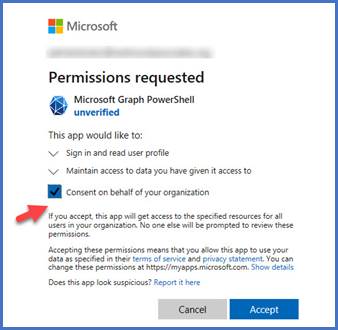
You need to check the box “Consent on behalf of your organization” and then click on “Accept” button to continue.
Q. Are there any Firewall Ports that we need to open in order to install and run SmartProfiler?
A. SmartProfiler for Active Directory, Microsoft 365 and AVD executes over specific ports. However, the SmartProfiler makes use of default communication ports and protocols for communicating with endpoints as explained in the table below. Please ensure to open these ports from the SmartProfiler computer to the target.
| Product | Target | Port | Protocol |
| SmartProfiler for Active Directory | PDC Emulator of each AD Domain Active Directory Web Services | 389 or SSL 9389 | LDAP or LDAPS LDAP or LDAPS |
| SmartProfiler for M365 | Microsoft 365 Tenant | 443 | HTTPS |
| SmartProfiler for AVD | Microsoft Azure Tenant | 443 | HTTPS |
Q. Can anyone log on the SmartProfiler Application?
A. No. SmartProfiler requires a username and password to log on to the application. The Username and password are created when the first tenant or AD Forest is registered. A Tenant or AD Forest can only be registered by supplying correct credentials such as Domain Admin account for registering AD Forest and Global Reader/Admin account for registering Microsoft 365 or Azure Tenants.
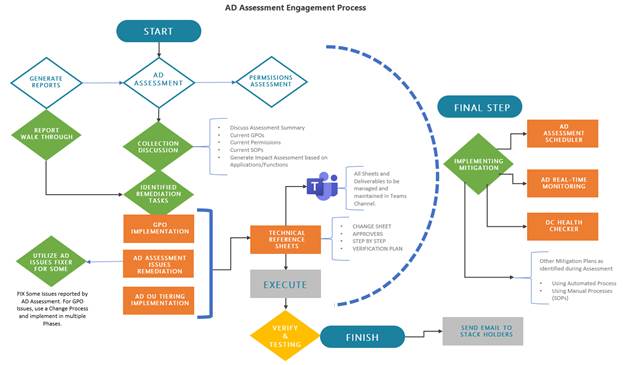
Q. Does DynamicPacks help in remediating the issues reported by the SmartProfiler for Active Directory and what is the engagement process:
A. DynamicPacks Team can help in remediating AD Issues reported by the SmartProfiler for Active Directory. We, at DynamicPacks, have an expert AD Team who follows a steady approach for fixing the issues as shown in below diagram:
For any questions related to SmartProfiler security please contact us at [email protected] or [email protected].
A. How can I install VMware PowerCLI modules manually on a disconnected computer:
Q. Follow the instructions explained below to install manually:
How to Install PowerCLI Offline
Not all servers can be connected to the internet due to security policies or other reasons. In this case, you can install VMware PowerCLI by using offline installation methods.
Installing PowerCLI offline by copying files
The first offline method to install PowerCLI involves using files downloaded from PS Gallery. The first steps are similar to the steps explained above when we need to find the module packages and install them in our Windows system.
Find-Module -Name VMware.PowerCLI
Save-Module -Name VMware.PowerCLI -Path <path>
In our case, the exact command with the correct path is:
Save-Module -Name VMware.PowerCLI -Path C:\Temp\Modules

Place the copied files to C:\Windows\System32\WindowsPowerShell\v1.0\Modules
Administrator rights are required.

cd “C:\Program Files\WindowsPowerShell\v1.0\Modules”
Get-ChildItem * -Recurse | Unblock-File
How to install PowerCLI offline from a ZIP archive
VMware provides an offline installer, which you can download and use to install PowerCLI offline on multiple computers.
The file name looks like VMware-PowerCLI-12.7.0-20091289.zip and the file size is about 100 MB.
C:\Windows\System32\WindowsPowerShell\v1.0\Modules
A. What are the ports required from SmartProfiler-SecID to Active Directory?
Q. Please ensure to open below default Active Directory ports from SmartProfiler-SecID to domain controllers:
Ports required for AD communication
The following ports are required for basic AD communication:
A. What are the ports required from SmartProfiler-SecID to VMware?
Q. Please ensure to open below default ports from SmartProfiler-SecID to VMware ESXi hosts and vCenter:
Note that SmartProfiler-SecID makes use of VMware PowerCLI and Port 8084 being the VUM SOAP server port is required to be opened.
Try SmartProfiler-SecID Assessment Tool.