
Technology Risks Finder
Create your Own Security Query
SecID allows you to build custom Risk Finder Templates using your own queries. For example, you can include checks for who can create, delete, or modify specific object types, along with other permission-based queries.
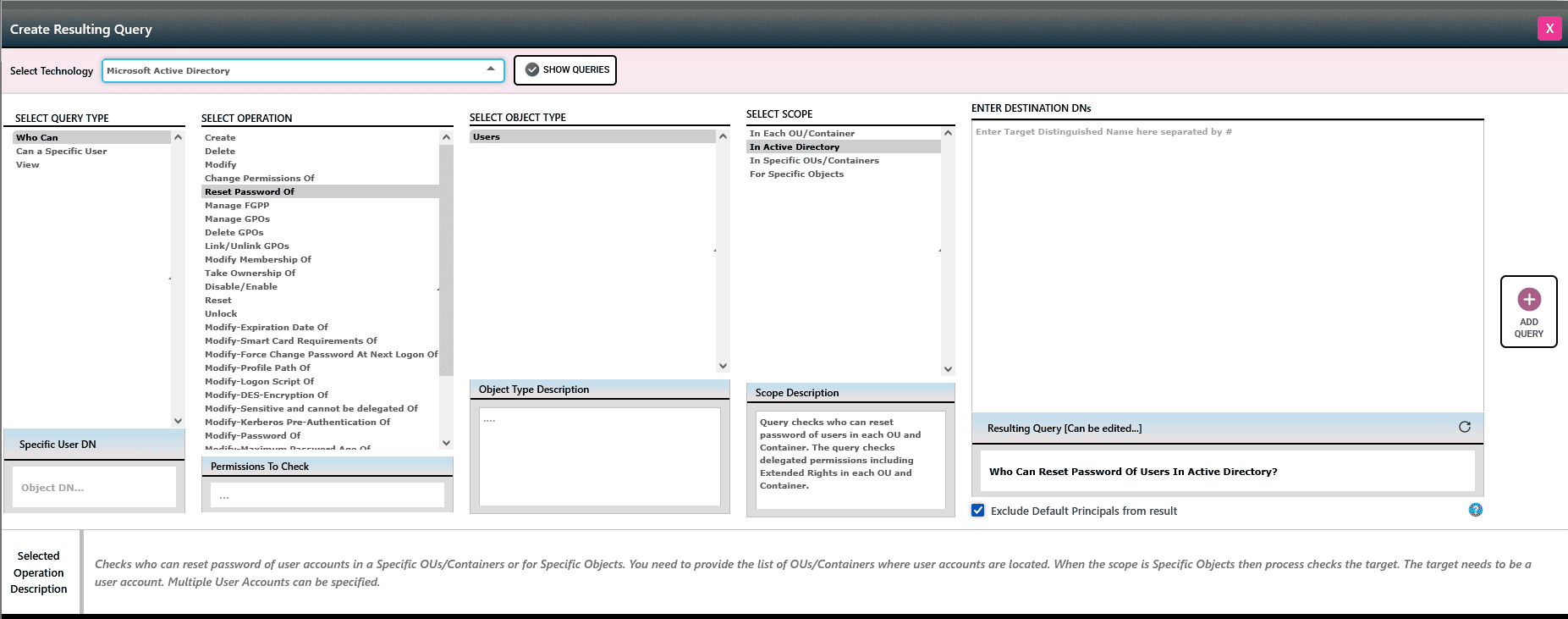
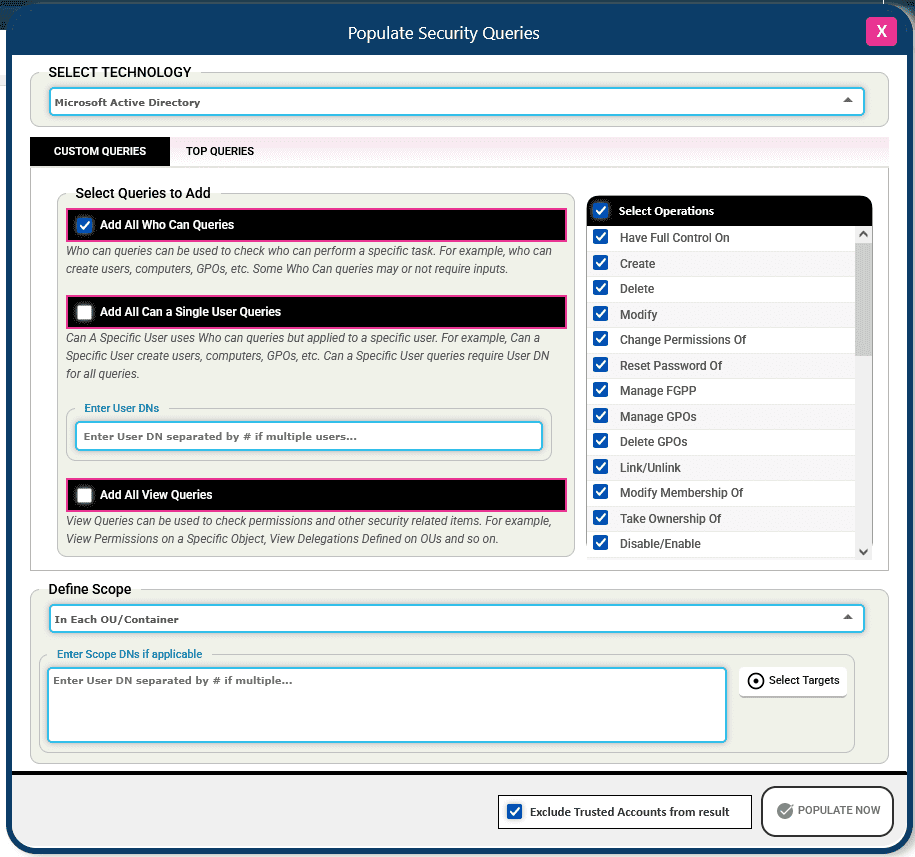
Add All or Top Queries
SecID enables you to add high-priority security queries, allowing you to efficiently run targeted checks against your Active Directory environment. This helps in quickly identifying security risks such as excessive privileges, misconfigured permissions, dormant accounts, and potential compliance violations. By surfacing these issues proactively, SecID supports continuous security monitoring and helps strengthen your overall identity and access management posture.
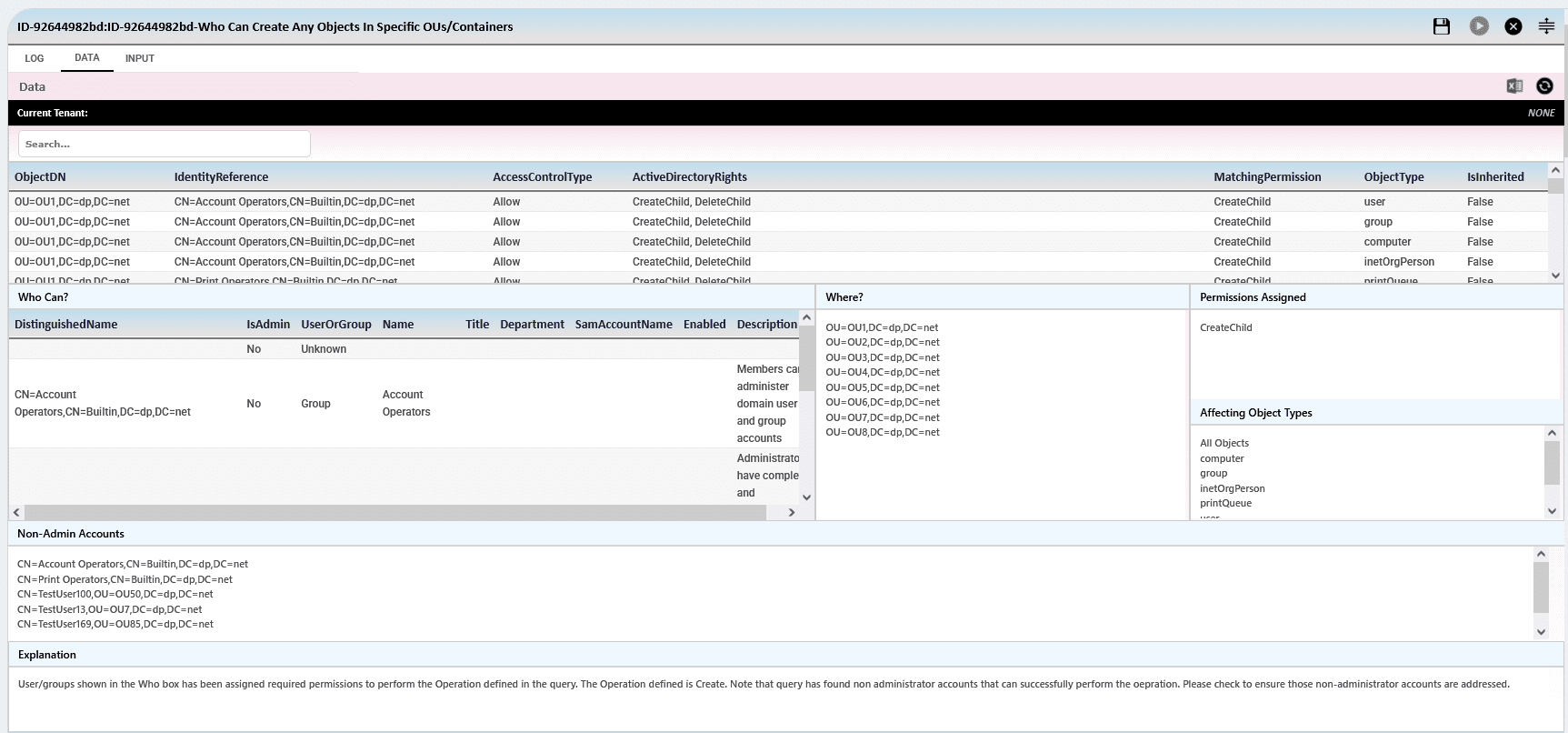
Quickly Execute a Query to find Risks
quickly execute the query to find risks
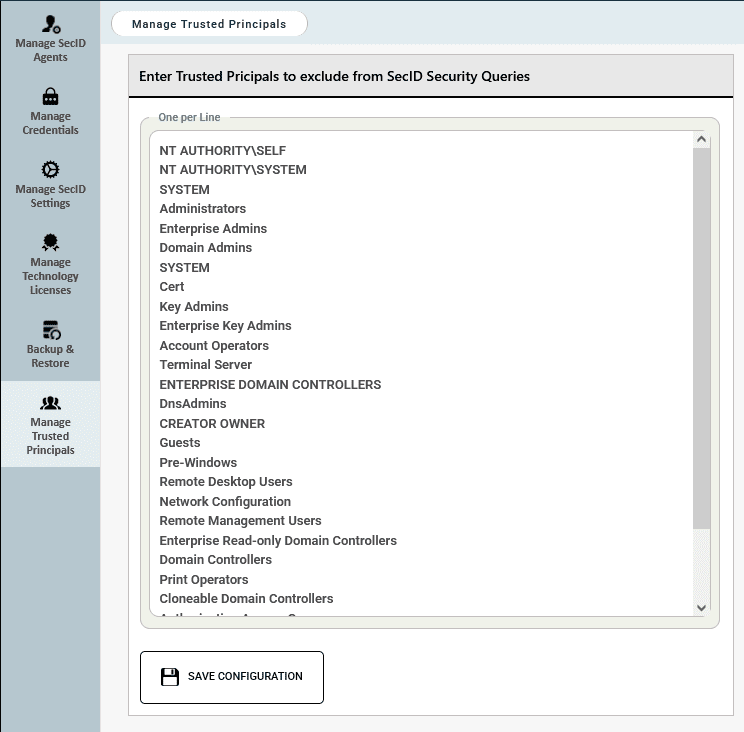
Exclude Your Trusted Principals
Trusted principals are user or group accounts that are considered reliable and may be granted specific permissions within Active Directory.
For example, you have defined a list of Trusted Principals and if SecID Technology Risks Finder identifies any users or groups that pose a potential risk due to their permissions in Active Directory and are NOT part of the Trusted Principals, you may want to review them. Trusted principals such as Domain Admins, Enterprise Admins, or any custom groups you consider safe should be excluded from the results to ensure the Risks Finder report remains focused and relevant.
We have defined a list of Trusted Principals to ensure they are excluded from the Risks Finder report. These default accounts are assigned standard permissions during Active Directory installation and can be safely added to the exclusion list.
List of Who Can Queries supported by Risks Finder for Active Directory
-
Who Can Have Full Control On Any Objects In Active Directory
-
Who Can Have Full Control On users In Active Directory
-
Who Can Have Full Control On computers In Active Directory
-
Who Can Have Full Control On Security Groups In Active Directory
-
Who Can Have Full Control On Organizational Units In Active Directory
-
Who Can Have Full Control On Contacts In Active Directory
-
Who Can Have Full Control On Managed Service Accounts In Active Directory
-
Who Can Have Full Control On Group Managed Service Accounts In Active Directory
-
Who Can Have Full Control On Printers In Active Directory
-
Who Can Have Full Control On Network Shares In Active Directory
-
Who Can Have Full Control On Service Connection Points In Active Directory
-
Who Can Have Full Control On Container In Active Directory
-
Who Can Create Any Objects In Active Directory
-
Who Can Create users In Active Directory
-
Who Can Create computers In Active Directory
-
Who Can Create Security Groups In Active Directory
-
Who Can Create Organizational Units In Active Directory
-
Who Can Create Contacts In Active Directory
-
Who Can Create Managed Service Accounts In Active Directory
-
Who Can Create Group Managed Service Accounts In Active Directory
-
Who Can Create Printers In Active Directory
-
Who Can Create Network Shares In Active Directory
-
Who Can Create Service Connection Points In Active Directory
-
Who Can Create Container In Active Directory
-
Who Can Delete Any Objects In Active Directory
-
Who Can Delete users In Active Directory
-
Who Can Delete computers In Active Directory
-
Who Can Delete Security Groups In Active Directory
-
Who Can Delete Organizational Units In Active Directory
-
Who Can Delete Contacts In Active Directory
-
Who Can Delete Managed Service Accounts In Active Directory
-
Who Can Delete Group Managed Service Accounts In Active Directory
-
Who Can Delete Printers In Active Directory
-
Who Can Delete Network Shares In Active Directory
-
Who Can Delete Service Connection Points In Active Directory
-
Who Can Delete Container In Active Directory
-
Who Can Modify Any Objects In Active Directory
-
Who Can Modify users In Active Directory
-
Who Can Modify computers In Active Directory
-
Who Can Modify Security Groups In Active Directory
-
Who Can Modify Organizational Units In Active Directory
-
Who Can Modify Contacts In Active Directory
-
Who Can Modify Managed Service Accounts In Active Directory
-
Who Can Modify Group Managed Service Accounts In Active Directory
-
Who Can Modify Printers In Active Directory
-
Who Can Modify Network Shares In Active Directory
-
Who Can Modify Service Connection Points In Active Directory
-
Who Can Modify Container In Active Directory
-
Who Can Change Permissions Of Any Objects In Active Directory
-
Who Can Change Permissions Of users In Active Directory
-
Who Can Change Permissions Of computers In Active Directory
-
Who Can Change Permissions Of Security Groups In Active Directory
-
Who Can Change Permissions Of Organizational Units In Active Directory
-
Who Can Change Permissions Of Contacts In Active Directory
-
Who Can Change Permissions Of Managed Service Accounts In Active Directory
-
Who Can Change Permissions Of Group Managed Service Accounts In Active Directory
-
Who Can Change Permissions Of Printers In Active Directory
-
Who Can Change Permissions Of Network Shares In Active Directory
-
Who Can Change Permissions Of Service Connection Points In Active Directory
-
Who Can Change Permissions Of Single Object In Active Directory
-
Who Can Change Permissions Of Domain Admins Security Group In Active Directory
-
Who Can Change Permissions Of Enterprise Admins Security Group In Active Directory
-
Who Can Change Permissions Of Containers In Active Directory
-
Who Can Change Permissions Of AdminSDHolder In Active Directory
-
Who Can Reset Password Of Users In Active Directory
-
Who Can Reset Password Of Privileged Accounts In Active Directory
-
Who Can Manage FGPP – In Active Directory
-
Who Can Manage GPOs – In Active Directory
-
Who Can Delete GPOs – In Active Directory
-
Who Can Link/Unlink GPOs – In Active Directory
-
Who Can Modify Membership Of Security Groups In Active Directory
-
Who Can Take Ownership Of Users In Active Directory
-
Who Can Take Ownership Of Computers In Active Directory
-
Who Can Take Ownership Of Security Groups In Active Directory
-
Who Can Take Ownership Of Organizational Units In Active Directory
-
Who Can Take Ownership Of Group Policy Objects In Active Directory
-
Who Can Disable/Enable Users In Active Directory
-
Who Can Disable/Enable Computers In Active Directory
-
Who Can Reset Computers In Active Directory
-
Who Can Unlock Users In Active Directory
-
Who Can Modify-Expiration Date Of Users In Active Directory
-
Who Can Modify-Smart Card Requirements Of Users In Active Directory
-
Who Can Modify-Force Change Password At Next Logon Of Users In Active Directory
-
Who Can Modify-Profile Path Of Users In Active Directory
-
Who Can Modify-Logon Script Of Users In Active Directory
-
Who Can Modify-DES-Encryption Of Users In Active Directory
-
Who Can Modify-Sensitive and cannot be delegated Of Users In Active Directory
-
Who Can Modify-Kerberos Pre-Authentication Of Users In Active Directory
-
Who Can Modify-Password Of Users In Active Directory
-
Who Can Modify-Maximum Password Age Of Users In Active Directory
-
Who Can Modify-Minimum Password Age Of Users In Active Directory
-
Who Can Modify-Lockout Duration Of Users In Active Directory
-
Who Can Modify-Lockout Threshold Of Users In Active Directory
-
Who Can Modify-Lockout Observation Window Of Users In Active Directory
-
Who Can Replicate Secrets – In Active Directory